 Tidy Doors
Spreadsheet template for small landlords
Rental Property Income & Expense Tracker
One workbook for 1–25 rental properties. Log rent and expenses as they happen, and get monthly totals plus a year-end summary sorted into IRS Schedule E expense lines, ready to hand to your tax preparer.
Download right after payment: .xlsx workbook (blank + example copy) and a 2-page PDF quick-start guide.
What it does
Built for people who own a few rentals and keep their own books, not for property-management companies.
Income and expense logs
1,000-row logs with dropdowns for property, income type, expense category and payment method. White cells are for typing; formulas live in grey cells.
Schedule E line mapping
Pick one of 15 expense categories named after the 2025 Schedule E (Form 1040) lines 5–19, and the line number fills itself in.
Year-end summary per property
A Schedule E tab totals rents and each expense line for up to 25 properties, side by side.
Monthly view
Income, expenses, net and expense ratio by month, for one property or all of them.
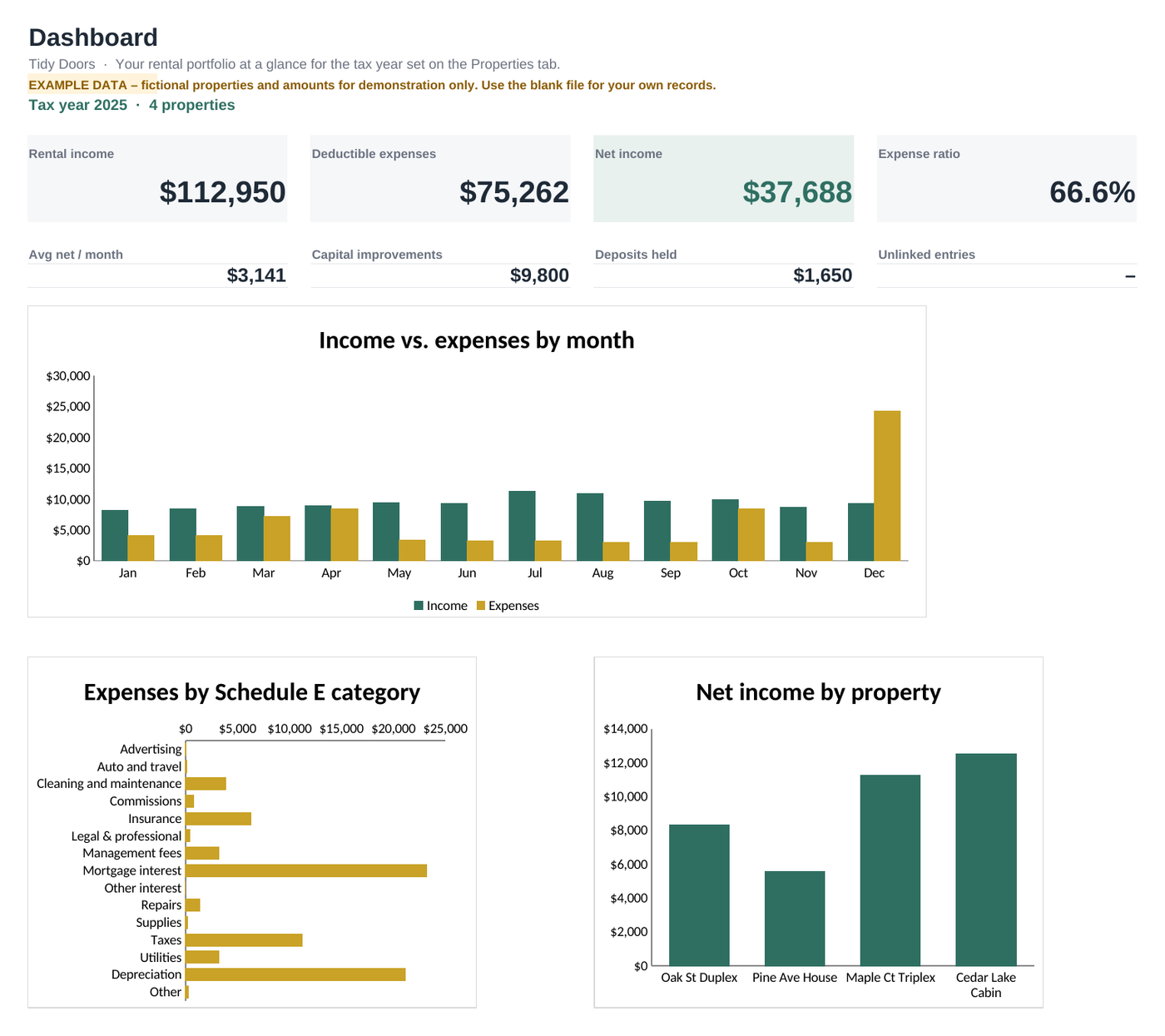
Dashboard with 3 charts
Income vs. expenses by month, expenses by category, and net income by property, all updating as you type.
Deposits and improvements kept apart
Refundable security deposits are tracked but not counted as income. Capital improvements are listed separately because they are depreciated, not deducted in one year.
See every tab
Screenshots use the included example copy. All properties, names and amounts are fictional.
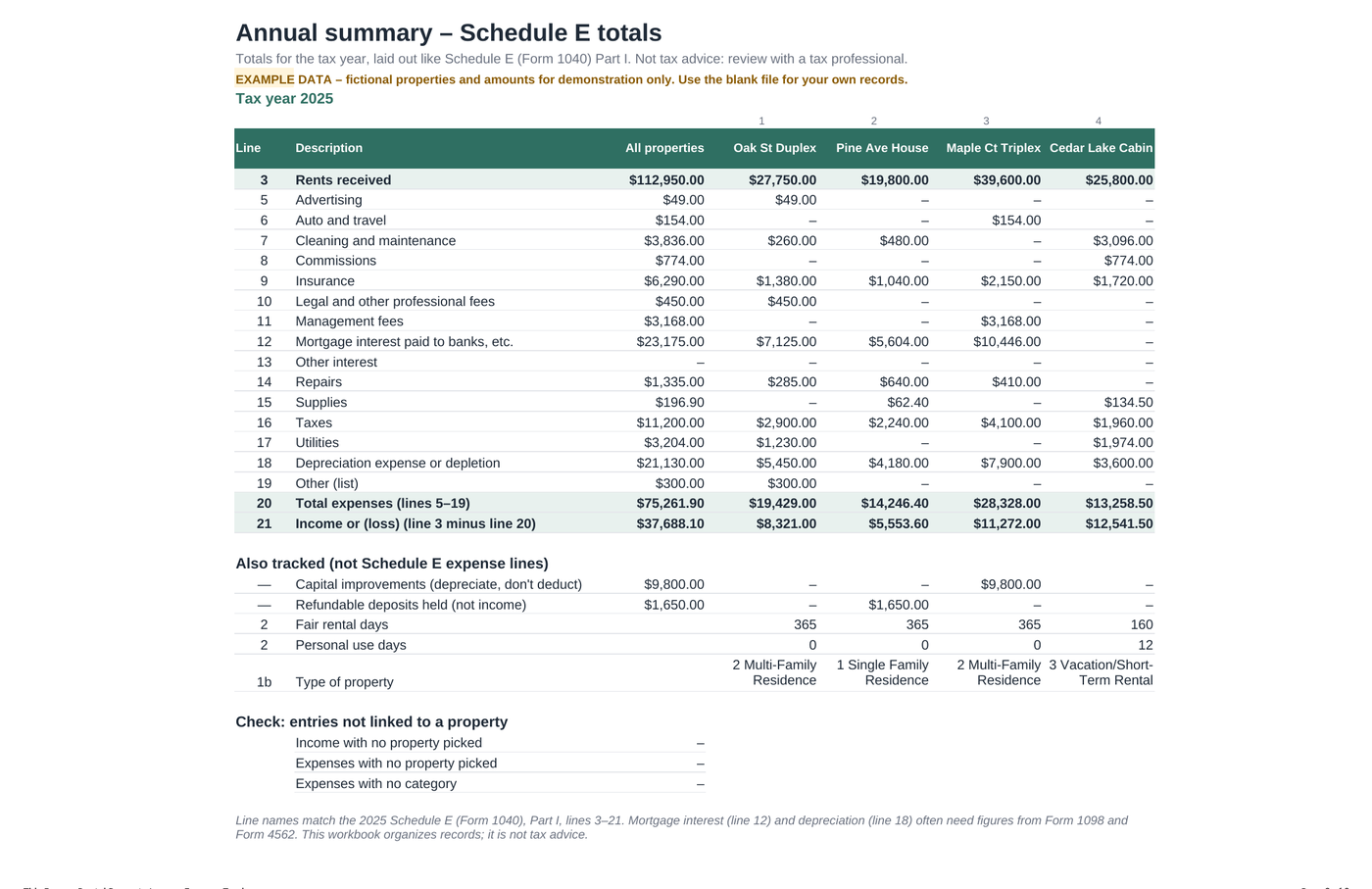
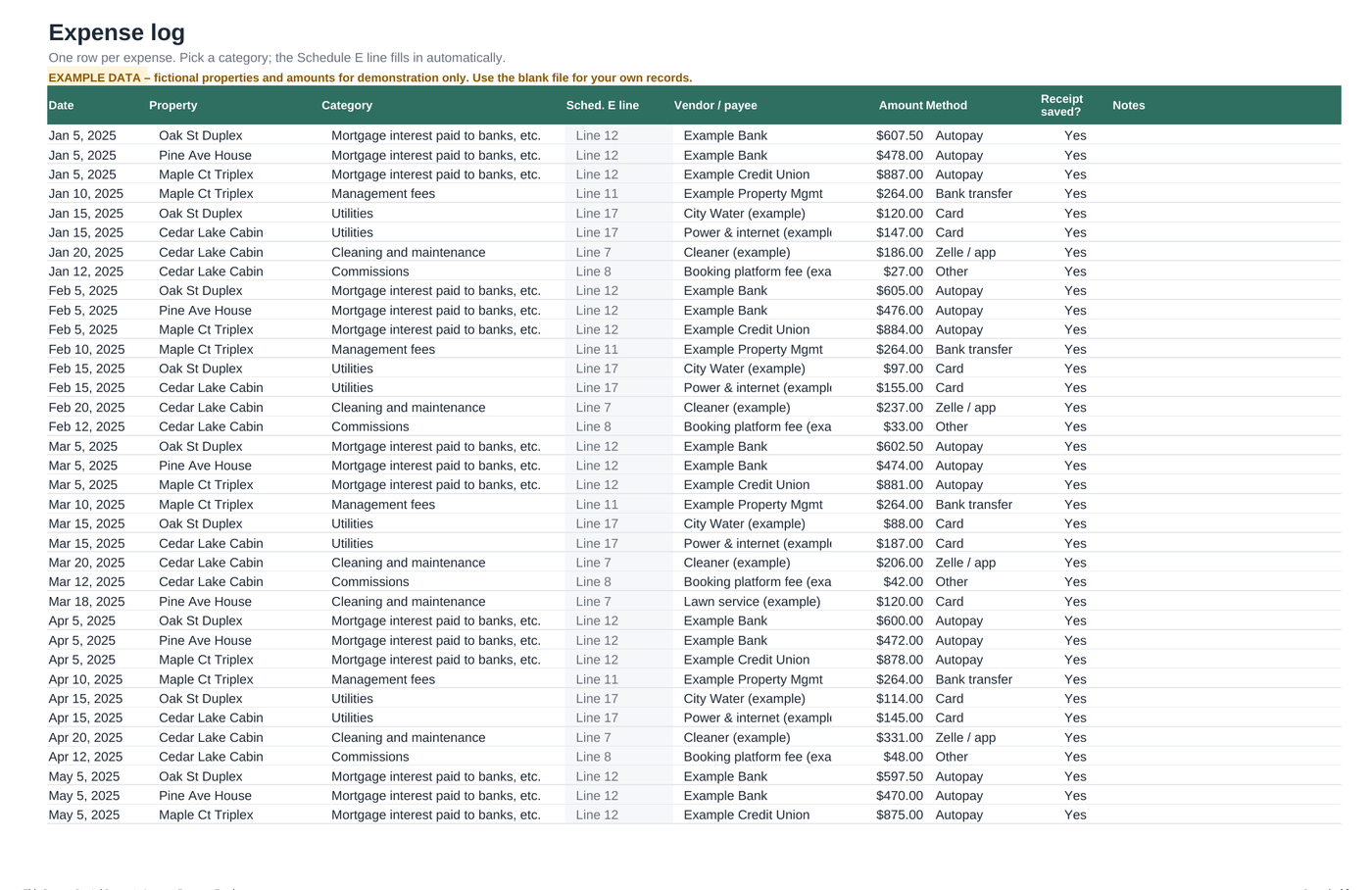
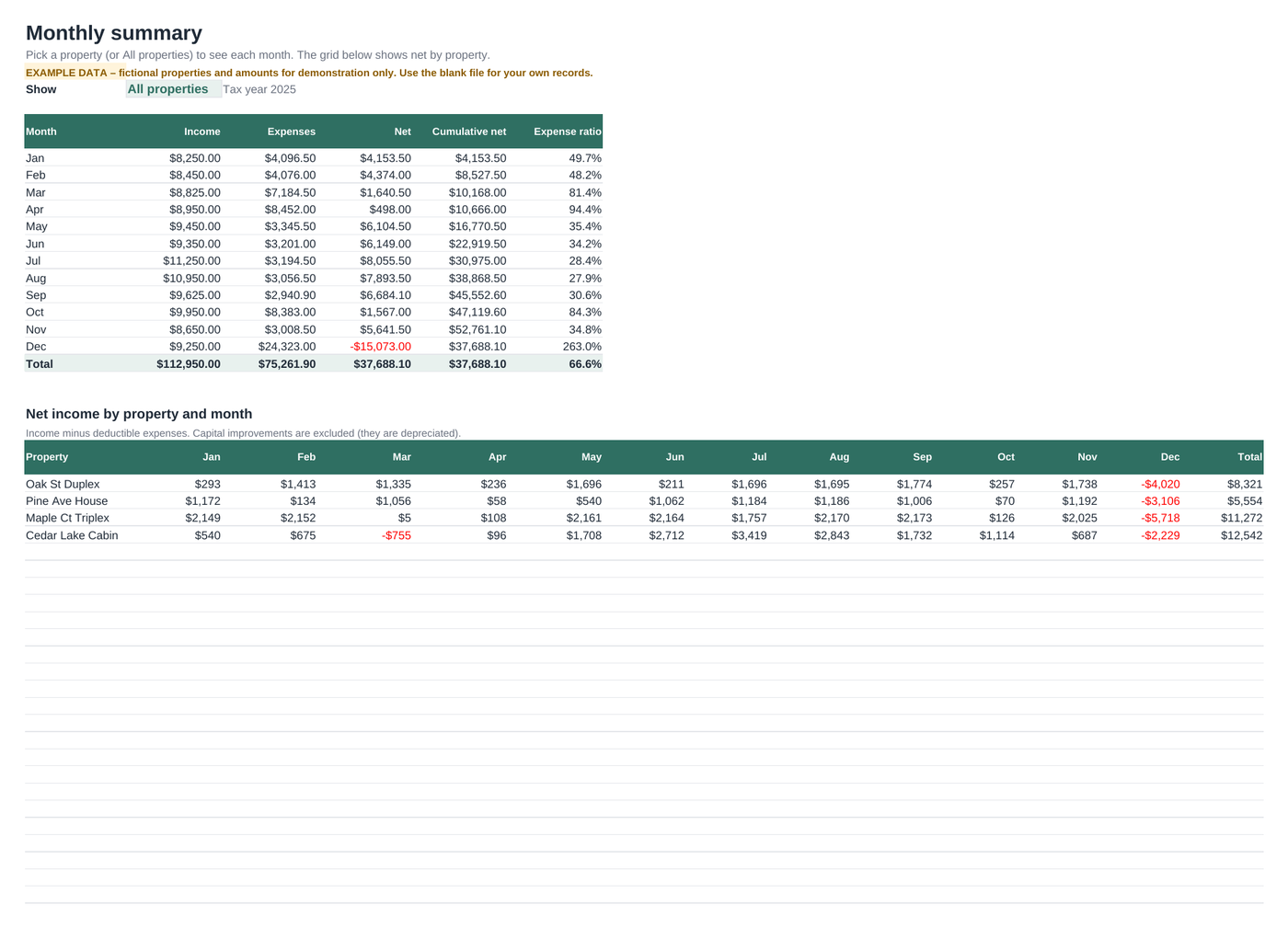
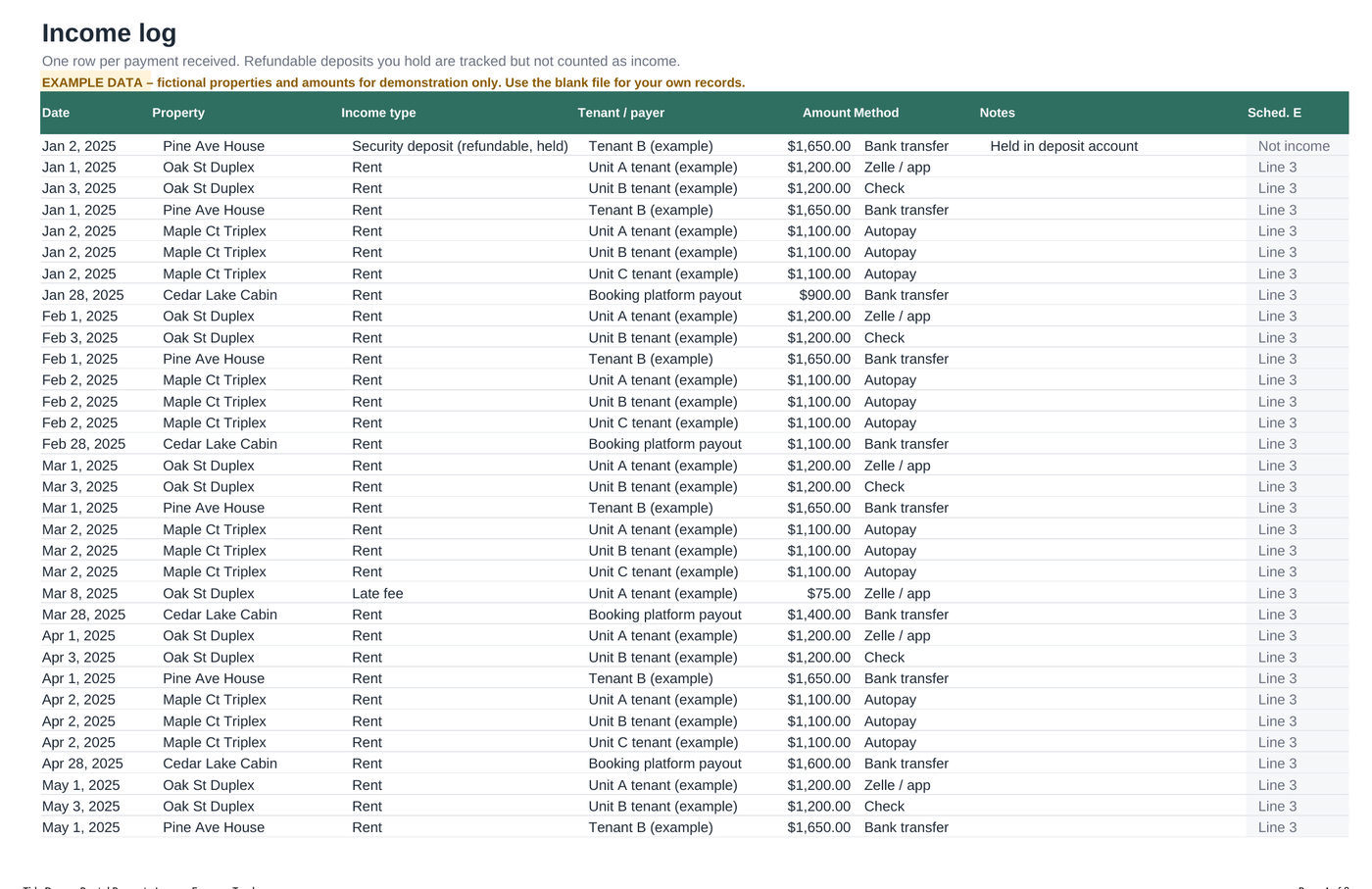
Top to bottom, left to right: Schedule E summary, Expenses log, Monthly summary, Income log.
What you get
- Tidy-Doors-Rental-Property-Tracker-v1-BLANK.xlsx: for your own records
- Tidy-Doors-Rental-Property-Tracker-v1-EXAMPLE.xlsx: the same workbook filled with fictional data, so you can see every tab working
- Tidy-Doors-Quick-Start-Guide.pdf: 2-page setup guide with the category-to-Schedule-E table
- 8 tabs: Start Here, Dashboard, Properties, Income, Expenses, Monthly, Schedule E, plus a hidden lists tab
- No macros, no add-ons, no account to create
What it doesn't do
- It is not tax software and does not file anything. It is not tax, legal or financial advice.
- It doesn't connect to your bank. You type or paste each entry.
- It doesn't calculate depreciation. You enter the annual figure (e.g. from Form 4562 or your preparer).
- Categories follow the US Schedule E. Outside the US, the logs and totals still work, but the line numbers won't match your forms.
- One tax year per file. Start a fresh blank copy each year.
Pricing
Rental Property Income & Expense Tracker v1.0
Depending on where you live, sales tax or VAT may be added at checkout. The final total is shown before you pay.
Tick the box above to continue. Payment is handled securely by Paddle.
Our order process is conducted by our online reseller Paddle.com. Paddle.com is the Merchant of Record for all our orders. Paddle provides all customer service inquiries and handles returns.
FAQ
Which apps does it work in?
It's a standard .xlsx file built with common functions only (SUMIFS, INDEX/MATCH, IF and similar) and no macros. Open it in Microsoft Excel, or upload it to Google Drive and choose File > Save as Google Sheets. It also opens in LibreOffice Calc.
How do I get the files?
Right after payment you're taken to a download page with links to all three files. Paddle also emails you a receipt. If you lose the download page, email us and we'll send the files again.
How many properties can I track?
Up to 25 properties, with 1,000 rows each in the income and expense logs per file.
Is this tax advice? Will it file my taxes?
No. It organises your records using the 2025 IRS Schedule E line names so your numbers are easy to hand to a tax preparer. Tax rules change and depend on your situation, so confirm with a qualified tax professional before filing.
Is it a subscription?
No. You pay $19 once and keep the files.
Can I share it or resell it?
The licence covers one buyer using it for their own properties. You can't resell or redistribute the files. See the Terms.
What if it isn't right for me?
Ask for a refund within 30 days of purchase and you'll get your money back. See the Refund Policy.
I made a mistake in my order (wrong email, bought twice).
Contact us at tidydoors@mail.grokbot.com or Paddle at paddle.net and we'll correct it or refund the duplicate.
Who will I see on my card statement?
Because Paddle.com is our reseller and Merchant of Record, the charge is made by Paddle rather than by us. The exact wording on your statement depends on your bank. If you don't recognise a charge, look it up at paddle.net.